

Price Level
ZH OpenEMR allows the Practices to define more than one price level per Cpt. The system also lets the user define how many levels of pricing needs to be in the system.
In order to add pricing levels click on Lists under the Administration Tab. This will bring the drop down menu of all the lists available in the system. Select the list titled Price Level as shown below.
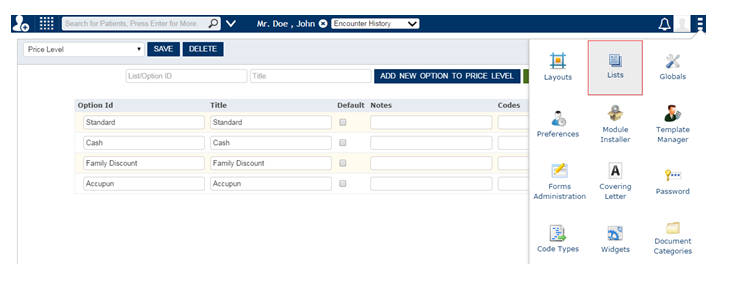
This list defines the levels of pricing available in the system. In the above example three pricing levels has been defined namely Standard, Cash and Capitated. The user can define as many levels as required and the order defines how they will appear in the screen where the fees are added.
The user can determine which price level should populate as default while creating an encounter by checking the box as shown in the above screen.