

Hook Management
The Hook Management enables to attach the sub components as ‘hooks’ to the different parts of the EMR.
The user can chose whether to Hook or attach his Reports, Encounters, Demographics and Combined form details to the HIE module. This connects the components of the HIE module to the EMR.
As shown below, it defines in which all pages the hook can be deployed in the system.

Note: The information is automatically saved as soon as the checkbox is selected
For Ex: Here “Send to HIE” is hooked with Reports, Encounter, Demographics and Combination Forms.
The screen shot below, shows how the “Send to HIE” is hooked with the Combination form. Once, the SHARE button is clicked, the module hooked with the combination form appears here.
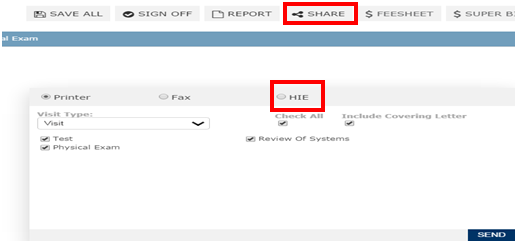
Select the HIE radio button and click on the SEND button to transfer the CCDA document.
Note – Both My Health and CCDA are selected by default