Import
This helps the user to import the CCDA document from another EMR and helps in attaching it our database by creating a new patient or merging it to an existing patient.
As seen in the below screenshot, if the imported document finds a matching patient, it will notify the user as Yes in match found column. It will also display the matched patient’s name.
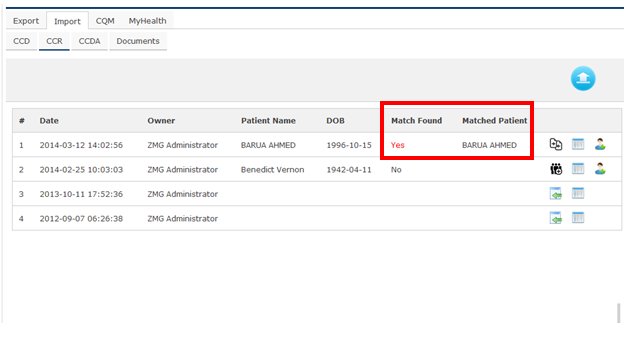
By click on the calender button, helps the user to View the document.
If the user wants to view the imported document and approve it, click plus option so that it takes to the following page
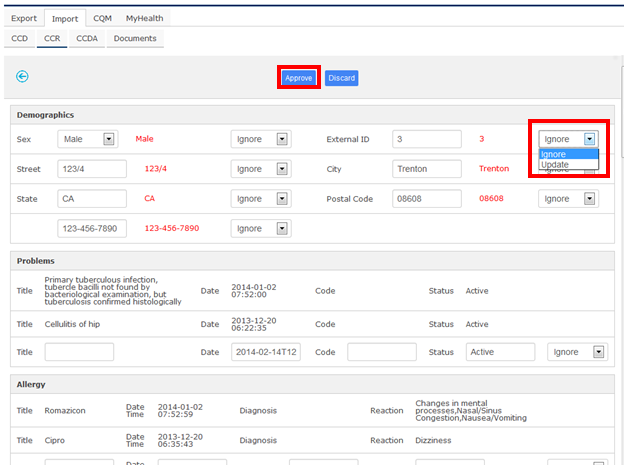
Whenever user wants to create a change in the information imported, they can make change in the respective fields and select as update. In the end, after verifying the changes made in the imported information’s, user clicks on the Approve button so that it get updated to the matched patient in the database.
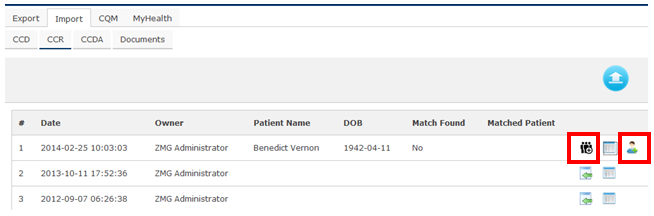
When a CCR document has been imported and does not find a matching patient, the user can create a new patient and install the document into it by clicking
button or it can be merged along with other patient by clicking