

Export(Transition Of Care)
This tab allows the user batch CCDA of multiple patients to be send electronically to the HIE. The below screen shot shows how the list of patients populate.
It lists out the PID, patient name, number of encounters, number of documents transferred, and number of successful transfers and date of last visit.
The next step is to select the patients using the checkboxes given at the extreme right side of the screen.
Once the patients are selected, click on the SENDTO button so that the CCDA documents are send to MyHealth.
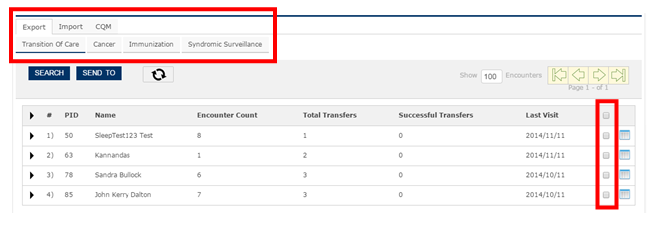
Note – Both My Health and CCDA are selected by default.
The user can populate the lists of patients by clicking SEARCH button and choosing from the filters shown below.
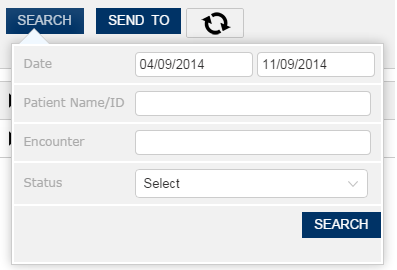
The user has the following filter options
- • Date
- • Patient ID
- • Encounter Number
- • Status