

History
As the word implies, this section of the patient Chart your way enable you to record the patient History like the Family History, Past Medical History, Lifestyle History.
Family History
The family History is broadly into two categories which are Primary family which includes Father, Mother, Sister, Grand Father, and Grand Mother and Secondary Family which are other family relative. You need to select if any disease has been occurred for the Primary or Secondary family members. The selected disease and its respective category of family members will be highlighted once the history form is saved. For e.g. if you have selected Renal Failure, Allergy Rhinitis, CAD/MI, CHF, Depression, and Epilepsy in the family history for the primary and secondary family members, these selected components will be highlighted in black font once saved. The rest of the unselected component will be grayed out. You also have an option to select a particular relative who is infected with a particular disease in the primary family category just by clicking the highlighted portion in the below screenshot.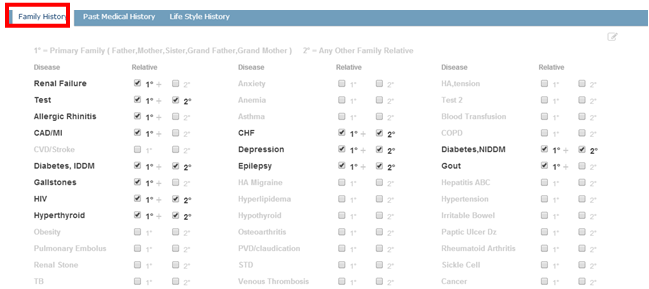 This in turn will allow you to select the primary family members as shown below. You can check box more than one member listed in the above screenshot and click “Save Family History” button so that the Family History gets saved.
  We can add more components into the family history by clicking edit option. Add the component into the title field.
 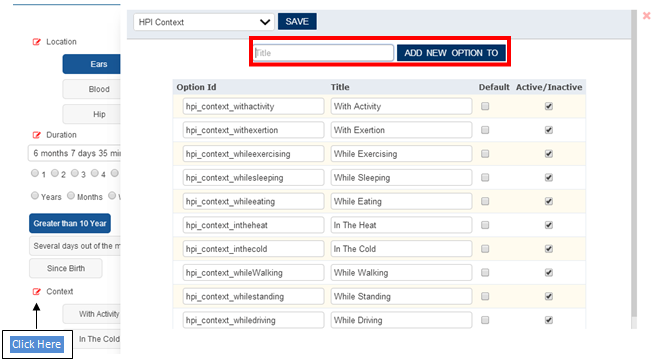 click “Add New Option To” so that the new component gets added.
Past Medical History
As the name implies, it allows you to record the patients past medical history. They consist of the following:
- Heent
- Respiratory
- Endocrine
You also have option to edit the components by clicking edit. There is also option to enter the hospitalization details to the past medical history screen. 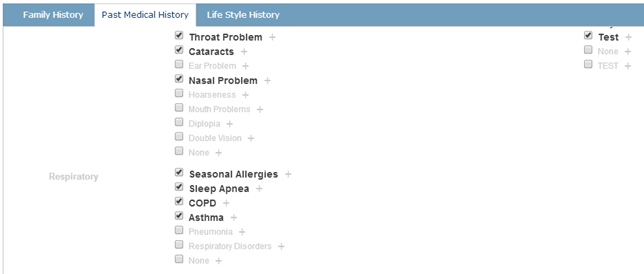 By clicking on ‘+’ button highlighted above, the hospitalization details can be added based on the user’s requirement.