

List Of Statuses And How It Works In ZH OpenEMR?
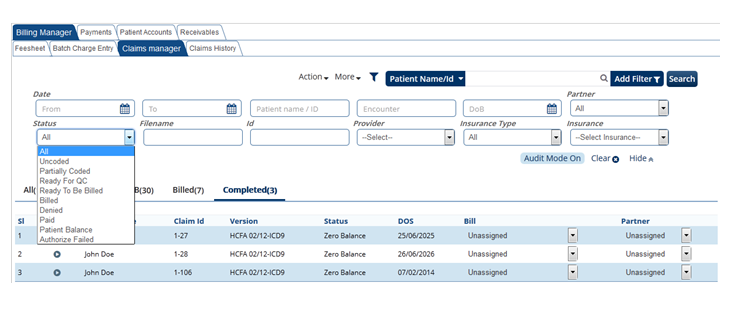
Status codes: This code enables to track claims with status codes.
See codes below and the explanations.
- Uncoded: Claims which do not have procedure code&diagnosis code will come under this status.
- Partially Coded: Claims have either the procedure or diagnosis missing will come under this status.
- Ready for QC: Claims which are entered in the system by a non authorized user will be queued as Ready for QC status. This search status helps the user to search and audit the claims to authorize for submission (queued to Ready to be Billed status) or user can make it authorize failed for further correction.
When quality check person search for claims using the Ready for QC status, It is required to check the
“Audit mode on” box right down. See below.
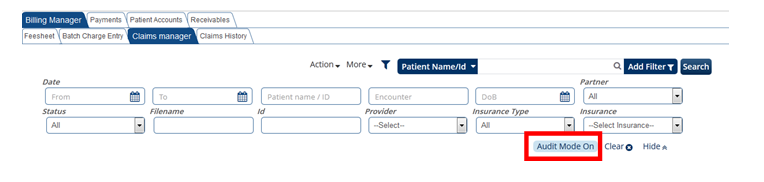
“Audit mode on” option allows the user to view the information entered in the fee sheet as shown below. Auditor can right click on any claim to view/edit all the information about the patient and the claims from the same screen is also shown below.
ZH OpenEMR has the best feature in auditing the claims and escalating it for correction , Authorize Failed is the option to identify claims which requires additional information or information missing or information not entered.

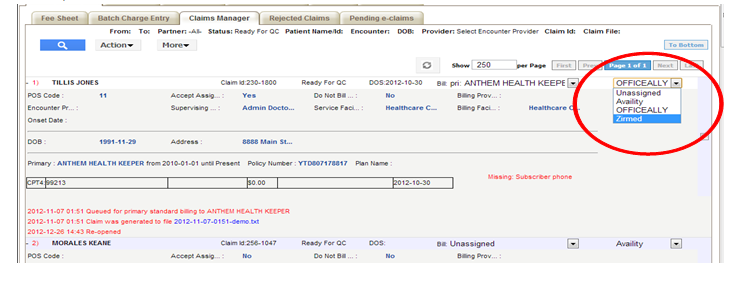
- Ready to be Billed: Claims which are authorized by the auditor can be generated in this screen.This status can be used to submit all claims at one go from this screen.
The user can select the X12 partner before submitting claims from claims manager screen as shown below,
- Billed: You can view the claims that are being billed (submitted to Insurance) by the user. User can also edit or view the claim information even after the claim was billed.
- Denied: Claims that are denied by the payers. User can re-work on the denied claims and can re-submit from this screen.
- Paid: Claims which are paid and posted in the system.
- Patient balance: Accounts with patient balance in the system can be generated in this screen for any correction required.
- Authorize Failed: User can generate claims which are marked as Authorize Failed by auditor to do necessary correction.
-
Once the required information been entered. User can make the claims as QC corrected and
authorize, this action will allow the system to que the claim into ready to be billed status.

- Capitation: Claims which are paid by capitation fee agreement can be genrated in this screen for verification.